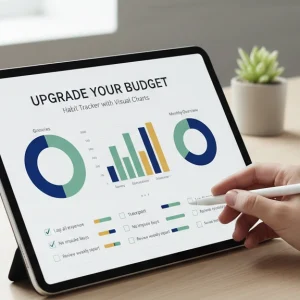
Assessing Your Current Budget Habit Tracker: Where to Start the Upgrade
Before diving into visual charts, take a moment to evaluate your current budget habit tracker. Ask yourself:
- What’s working well? Identify the features and layouts that help you stay consistent.
- Where do you get stuck? Notice if any parts feel confusing or uninspiring.
- Are you tracking all key areas? Check if you monitor expenses, savings, and spending trends adequately.
This honest review sets the foundation for an effective upgrade. Visual tools aren\’t just decoration—they should clarify your financial habits and motivate you to stick with your budget. Once you know where you stand, you can start matching the right budget visualization tools to your habits and goals.
Ready to transform your tracking routine? Let’s dive into the essential chart types that bring your numbers to life!
Essential Chart Types for Budget Habit Visualization
Choosing the right chart types is key to making your budget habit tracker truly effective. Different visuals highlight different patterns in your money management, so matching charts to your financial goals helps you stay on track.
Here are the essential budget visualization tools to consider:
-
Pie Charts: Great for seeing a snapshot of your spending breakdown. Use monthly budget pie charts to instantly spot where your money goes—whether it\’s bills, groceries, or entertainment.
-
Bar Charts: Perfect for tracking savings progress or comparing expenses over time. Bar chart savings goals help you visualize how close you are to hitting targets.
-
Line Graphs: Ideal for spending trend analysis. If you want to monitor fluctuations in income or expenses across weeks or months, line graph financial tracking offers clear insight.
-
Dashboards: Dynamic budget dashboards bring all your financial habit charts into one place. They can combine multiple visuals like expense tracking graphs and savings progress dashboards, giving you a complete picture at a glance.
-
Infographics: Personal finance infographics are useful for summarizing complex data in a simple, visual format. They’re handy if you want to share or review your habits quickly.
By aligning these chart types with your personal goals, you create a habit-building spreadsheet that’s easier to understand and stick with. Whether you’re focused on cutting spending, boosting savings, or tracking monthly budgets, the right visuals make your financial progress clearer—and your budgeting habit stronger.
Step-by-Step Guide: Integrating Visual Charts into Your Tracker
Upgrading your budget habit tracker with visual charts doesn\’t have to be complicated. Here’s a simple way to add easy-to-understand visuals that help you see your financial habits clearly.
1. Choose the Right Chart Type
- Pie charts work well for visual expense breakdowns, showing where your money goes each month.
- Bar charts are great for comparing savings goals or monthly spending categories.
- Line graphs help track spending trends and savings progress over time.
2. Gather Your Data
- Collect your budget info: expenses, income, savings.
- Use consistent categories like groceries, bills, entertainment to keep it clear.
3. Pick Your Tool
- Use free tools like Google Sheets, Excel, or budget visualization tools with built-in charts.
- Many platforms offer automated finance reports and dynamic budget dashboards; these can save time.
4. Input Your Data
- Enter your numbers into the spreadsheet or app.
- Set up categories so your charts can update automatically.
5. Create and Customize Your Charts
- Insert your chosen chart type based on your data.
- Customize colors and labels to highlight key insights, like overspending or savings growth.
6. Review and Adjust Weekly
- Make it a habit to check your financial habit charts regularly.
- Update your data weekly to spot spending trends and adjust your budget accordingly.
By following these steps, you can turn raw budget numbers into clear, actionable money management visuals that motivate and guide your financial decisions.
Real-World Applications: Case Studies and Custom Upgrades for Everyday Budgeters

Let’s look at how everyday people have upgraded their budget habit tracker with visual charts to better manage their money. These real-world examples show how simple tweaks can make a big difference.
Case Study 1: Sarah’s Spending Trend Analysis
Sarah struggled to see where her money went each month. By adding monthly budget pie charts and bar chart savings goals, she quickly spotted which categories ate up most of her income. This helped her cut back on dining out and boost her savings, all tracked on a dynamic budget dashboard she updates weekly.
Case Study 2: Mike’s Automated Finance Reports
Mike wanted a hands-off solution for his budget tracking. Integrating automated finance reports and habit-building spreadsheets allowed him to watch his progress effortlessly. The visual expense breakdowns kept him motivated, showing spikes and dips in his spending trend analysis at a glance.
Custom Upgrades for Personal Finance Needs
- Savings progress dashboard: Great for those saving for specific goals like a home or vacation.
- Personal finance infographics: Help visualize debt payoff and income sources clearly.
- Line graph financial tracking: Perfect for tracking monthly income vs. expenses.
By tailoring charts to what matters most, anyone can upgrade their budget habit tracker into a clear, visual tool that works for their lifestyle. The key? Pick charts that highlight your strongest financial habits or weakest spots. This makes daily money management easier to stick with, turning numbers into actionable insights you actually understand.
Maximizing Engagement: Tips to Make Visual Charts a Daily Budget Habit
To get the most from your upgraded budget habit tracker, you need to keep visual charts front and center in your daily routine. Here’s how to make money management visuals stick:
-
Set Daily Check-ins
Spend just 5 minutes each day reviewing your spending trend analysis and savings progress dashboard. This builds habit and helps catch small budget leaks early.
-
Use Dynamic Budget Dashboards
Interactive charts that update automatically keep your budget visualization tools fresh and interesting. The more dynamic the visuals, the more likely you are to stay engaged.
-
Customize Your Visuals
Tailor personal finance infographics like monthly budget pie charts or bar chart savings goals to reflect your specific habits and targets. Customized visuals feel relevant and motivating.
-
Celebrate Small Wins
Highlight positive shifts in your expense tracking graphs or goal-oriented budget templates. Seeing progress in visual form turns budgeting into a rewarding experience, not a chore.
-
Keep It Simple
Don’t overload your tracker with too many charts. Focus on the key visuals that show your spending and saving patterns clearly. Simpler habit-building spreadsheets prevent overwhelm.
-
Integrate With Your Lifestyle
Link your financial habit charts to smartphone widgets, calendar reminders, or morning routines so you naturally glance at your budget every day without extra effort.
By making visual expense breakdowns part of your daily life, you anchor budgeting habits that last. It’s about turning numbers into insights you want to check—not just must check.
Top Free Resources and Tools to Kickstart Your Visual Upgrade
Getting started with visual charts for your budget habit tracker doesn’t have to cost a thing. There are plenty of free tools and downloadables that can help you bring your money management visuals to life quickly and easily. Here are some top picks to try out:
-
Google Sheets
Comes with built-in chart options like bar charts, pie charts, and line graphs that are perfect for tracking expenses, savings progress, and spending trends. Plus, it’s cloud-based, so you can access your dynamic budget dashboards anywhere.
-
Microsoft Excel Online
Free with a Microsoft account, this offers similar spreadsheet functions and automated finance reports. It also supports personal finance infographics and financial habit charts that make your data easy to understand.
-
Canva (Free Version)
Great for creating custom personal finance infographics and goal-oriented budget templates. Canva’s drag-and-drop interface helps you visualize your monthly budget pie charts and visual expense breakdowns with style.
-
Tiller Money (Trial Version)
If you want habit-building spreadsheets that update automatically with your bank data, Tiller offers a free trial. This tool supports spending trend analysis and savings goals via line graph financial tracking.
-
Budget Visualization Tools on Github
For those comfortable with a bit of DIY, open-source downloadable templates and dashboards can be found here. They’re great for customizing dynamic budget dashboards specific to your needs.
-
Mobile Apps
Apps like Mint and PocketGuard include free visuals such as bar chart savings goals and expense tracking graphs to keep your budget habits on track daily.
These tools cover everything from basic charts to in-depth dashboards, making it easy for global users to upgrade their budget habit tracker with no upfront cost. Download, explore, and start turning your numbers into clear, actionable visuals.